
HTML5学习笔记(一)
#1. What is HTML5?
- Html5有新的语法,界面和多媒体元素
- Html有新的form元素 和更方便简历web应用的新的API函数
- HTML5 is cross-platform, designed to work on types of hardware
(PCs, Tablets, Phones, TVs, etc.). - Html5是跨平台,设计在多种类型的硬件上的
##1.1. What is New in HTML5?
1 | <!DOCTYPE html> <!--新的文件类型--> |
##1.2. New Attribute Syntax
新标准允许有四种语法属性, 以input为例
1 | <input type="text" value="John Doe" disabled> <!--空属性--> |
##1.3. HTML5 - New Features
- 新的语法元素,例如
<header>, <footer>, <article>, and <section>. - 新的form控制,例如
number, date, time, calendar, and range <canvas> and <svg>强大的图像支持和<video> and <audio>多媒体支持- 强大的新API
##1.4. HTML5 - Removed Elements
1 | <acronym> |
#2. HTML5 Browsers
帮助浏览器处理html5语言
##2.1. Browser Support
无论新旧服务器都会处理为识别的html文本为内联元素
inline elements.,因此可以帮助浏览器处理未识别元素
##2.2. The Browser Trick(欺骗)
1 | <!DOCTYPE html> |
#3. HTML5 New ElementsNew Semantic/Structural Elements
具体改变看文档
HTML5文档
#4. HTML5 Semantic Elements
语义元素Semantic elements是元素的意义
语义元素可以清晰的给开发者和浏览器描述含义, 没有语义的元素没有告诉任何含义, 例如:`: <div> and <span>`,带有语义的元素清晰的定义了含义:<form>, <table>, and <img>
##4.1. Browser SupportIE9(IE8及以下不支持) chrome 火狐 欧朋(opera)
##4.2. New Semantic Elements in HTML5
- 现今许多web网站包含html代码,例如:
<div id="nav">, <div class="header">, or <div id="footer">, to indicate navigation links, header, and footer - html5提供新语义元素用以更清楚的定义网站的每个模块布局
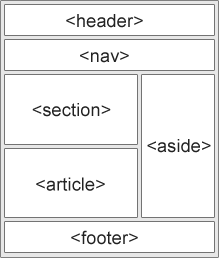
##4.3. HTML5 <section> 元素定义了一个文档中的片段
1 | <section> |
##4.4. HTML5
<article> element表示独立,自用的内容
article应该有意义,并应该尽可能在网站的剩余空间中独立分布<article>应该用于:
- Forum post
- Blog post
- News story
- Comment
1 | <article> |
##4.5. HTML5
1 | <nav> |
##4.6. HTML5
1 | <aside> |
##4.6. HTML5
<header> element表示文档或者段落的头部,<footer>表示文章段落或者文档的尾部,<footer>通常包含文档作者,版权,使用的一系列链接,联系信息等<header>应该用作介绍内容的容器(container)- 文档中可以用多个
<header>,<footer>
1 | <article> |
##4.7. HTML5
<figure> tag表示独立的内容, 如:图片,表格,代码表
- 当
<figure>元素的内容是有关于主流程的时候,它的位置是独立的主流程,并且如果除去它应该不影响文档流。 <figcaption> tag定义了<figure> 元素的标题
1 | //生成一个关于图片表格代码列表的模块 |
##4.8. Can We Start Using These Semantic Elements?
上面所讲的都是
块元素,为了使这些元素在过去的浏览器正确的工作,通过设置使过去的浏览器正确的render这些元素
1 | header, section, footer, aside, nav, main, article, figure |
##4.9. Semantic Elements in HTML5
HTML Tag Reference
#5. HTML5 Form Elements 表格
html5包含以下三种新的元素
<datalist><keygen><output>(并非所有浏览器都支持新元素)
##5.1. HTML5
<datalist> element描述<input> element可选项的列表<datalist> element为<input> element提供了自动填充的功能,在用户输入数据的时候会在下拉菜单中看到预先定义的可选项列表- 使用
<input> element的列表属性与<datalist> element绑定到一起
1 |
|
##5.2. HTML5
<keygen> element提供一个安全的方式去授权用户
<keygen> element表示在表格form中一个关键词对生成器, 当form中的内容被提交, 会生成一个共有一个私有的关键词- 私有关键词被存储在当地, 共有关键词发送到服务器。 共有关键词可用来生成用户授权证明
1 | <form action="demo_keygen.asp" method="get"> |
##5.3. HTML5
1 | <form oninput="x.value=parseInt(a.value)+parseInt(b.value)">0 |
#6. HTML5 New Input Types
html5有一些新的form的输入类型,新的特征使他更有效和更好的输入控制
- new input types:
- color
- date
- datetime
- datetime-local
- month
- number
- range
- search
- tel
- time
- url
- week
##6.1. Input Type: number
number输入类型用来使输入的值包含数字,并且可以设置数字的限制(依赖与浏览器支持)
1 | <form action="demo_form.asp"> |
##6.2. Input Restrictions
form限制
1 | <form action="demo_form.asp"> |
##6.3. Input Type: date 日期date type用于form 表示应该包含日期
1 | <form action="demo_form.asp"> |
##6.4. Input Type: colorcolor type表示输入包含颜色
1 | <form action="demo_form.asp"> |
##6.5. Input Type: rangerange type表示输入应包含范围
1 | <form action="demo_form.asp" method="get"> |
##6.6. Input Type: monthmonth type 允许用户选择年份和月份
1 | <form action="demo_form.asp"> |
##6.7. Input Type: weekThe week type 允许用户选择年份和星期
1 | <form action="demo_form.asp"> |
##6.8. Input Type: time time type允许用户选择时间, 但是没有时间选择弹窗
1 | <form action="demo_form.asp"> |
##6.9. Input Type: datetime
The datetime type allows the user to select a date and time (with time zone).datetime type允许用户选择日期和时间,带有时间输入区域
1 | <form action="demo_form.asp"> |
##6.10. Input Type: datetime-localdatetime-local type用户选择时间和日期
1 | <form action="demo_form.asp"> |
##6.11. Input Type: email
The email type用来输入一个邮箱格式的邮箱, 并且会在提交的时候检查邮箱的合法性- 一些智能手机能够识别邮箱类型
1 | <form action="demo_form.asp"> |
##6.12. Input Type: searchThe search type 类似于一个文本输入框, 用于进行搜索
1 | <form action="demo_form.asp"> |
##6.13. Input Type: urlThe url type用于输入utl地址
根据不同的浏览器。 这个url会被自动识别是否合法,一些智能手机也能识别
1 | <form action="demo_form.asp"> |
#7. HTML5 Form Attributes
html5中<form>和<input>有一些新的属性
<form>:autocompletenovalidate<input>:: autocomplete autofocus form formaction formenctype
formmethod formnovalidate formtargetheight and widthlistmin and max
multiple
pattern (regexp)
placeholder
required
step
#7.1. <form> / <input> autocomplete Attribute
- 自动补全属性指明是否form或者input打开或者关闭自动补全功能
- 当打开自动补全,浏览器会自动填写预先输入的信息
- tip:可能form已经打开了自动不全,input关闭了, 反之亦然, 一些浏览器可能默认打开自动填充
- Note:自动补全在
<form>``<input>中text, search, url, tel, email, password, datepickers, range, and color类型有效
1 | <form action = "demo_form.asp" autocomplete = "on"> |
##7.2. <form> novalidate AttributeThe novalidate attribute是一个布尔属性
表明一个form输入的数据在提交的时候无需验证
1 | <form action="demo_form.asp" novalidate> |
##7.3. <input> autofocus Attributeautofocus Attribute是一个布尔属性 an <input> element should automatically get focus when the page loads.当加载页面的时候,自动进入input输入框状态
1 | <form action="demo_form.asp"> |
##7.4. <input> form Attribute(不理解)
form属性 指定一个<input>元素属于一个或多个表单。 要引用一个以上的表单,使用表单ID的空格分隔的列表
1 | <form action="demo_form.asp" id="form1"> |
##7.5. <input> formaction Attribute
OperaSafariChromeFirefoxInternet Explorer
The formaction attribute指定文件的URL, 这个文件会在表单提交的时候进行输入处理The formaction attribute不考虑form中的the action attribute- Note:这个属性与type=”submit” and type=”image”一起使用
1 | <form action="demo_form.asp"> |
##7.6. <input> formenctype Attribute
OperaSafariChromeFirefoxInternet Explorer
The formenctype attribute指示表单数据怎么编码, 当数据提交到服务器的时候(只有在form的method = “post”)The formenctype attribute覆盖<form>元素的the enctype attribute- Note:The formenctype attribute is used with type=”submit” and type=”image”.
1 | <form action="demo_post_enctype.asp" method="post"> |
##7.7. <input> formmethod Attribute
The formmethod attribute定义了发送表单数据到URL的HTTP协议The formmethod attribute覆盖<form>元素的the method attribute- Note: The formmethod attribute can be used with type=”submit” and type=”image”.
1 | <form action="demo_form.asp" method="get"> |
##7.8. <input> formnovalidate Attribute
The novalidate attribute是一个布尔属性- 表示
<input> element被提交时不应该被验证 The formnovalidate attribute覆盖the <form> element.的the novalidate attribute- Note: The formnovalidate attribute can be used with type=”submit”.
1 | <form action="demo_form.asp"> |
##7.9. <input> formtarget Attribute
- The formtarget attribute表示一个名字或者一个关键词,用来表明在提交表单后在何处显示收到的response
The formtarget attribute覆盖<form>的the target attribute- Note: The formtarget attribute can be used with type=”submit” and type=”image”.
1 | <form action="demo_form.asp"> |
##7.10. <input> height and width Attributes
- 高度和宽度属性表明了
<input> element的高度和宽度 - 这两个属性只能被用于
<input type="image"> - 总是指明图像的高度和宽度。 如果高度和宽度被设置,当网页被加载图像的空间需求会被预留。然而,没有设置这些属性,浏览器不知道图像尺寸,不能预留合适的空间。这会导致图像加载时的布局改变
1 | <form action="demo_form.asp"> |
##7.11. <input> list Attribute
The list attribute是指<datalist> elemen, 它包含预先定义的选项的<input>(The list attribute refers to a
1 | <input list="browsers" name="browser"> |
##7.12. <input> min and max Attributes
Note: The min and max attributes works with the following input types: number, range, date, datetime, datetime-local, month, time and week.The min and max attributes是指<input>中最大值和最小值
Note: The min and max attributes 与以下input 类型一起共存: number, range, date, datetime, datetime-local, month, time and week.
1 | <form action="demo_form.asp"> |
##7.13. <input> multiple Attribute
The multiple attribute是一个布尔属性- 当它出现, 表明允许用户在
<input>中输入多个值 - Note: The multiple attribute works with the following input types: email, and file.
1 | <form action="demo_form.asp"> |
##7.14. <input> pattern Attribute
The pattern attribute是指一个正则表达式,<input>元素的值被再次检查- Note: The pattern attribute works with the following input types: text, search, url, tel, email, and password.
- Tips: 使用
the global title attribute描述pattern来帮助用户
1 | <form action="demo_form.asp"> |
##7.15. <input> placeholder Attribute 重要
The placeholder attribute是指对于期望的输入值的一个简单的提示- 在用户输入之前,这个简单提示出现在输入栏
- Note: The placeholder attribute works with the following input types:
text, search, url, tel, email, and password.
1 | <form action="demo_form.asp"> |
##7.16. <input> required Attribute
The required attribute是一个布尔值- 当它出现,表明提交的表单不能为空, 必须被填上值
- Note: The required attribute works with the following input types:
text, search, url, tel, email, password, date pickers, number, checkbox, radio, and file.
1 | <form action="demo_form.asp"> |
##7.17. <input> step Attribute
The step attribute specifies是<input>中的合法的间距Example: if step=”3”, legal numbers could be -3, 0, 3, 6, etc.
- Tip: The step attribute can be used together with the
max and min attributes to create a range of legal values. - Note: The step attribute works with the following input types:
number, range, date, datetime, datetime-local, month, time and week.
1 | <form action="demo_form.asp"> |